
AI-generated images are one of the hottest content niches right now — and for good reason. People search for “AI image prompts,” “trending AI art ideas,” and “how to generate AI images” millions of times a month. If you run a blog, YouTube channel, or Instagram page around AI content, this niche pulls in high-value traffic, which usually means better ad rates (RPM) because advertisers in the tech, software, and creative-tools space bid aggressively on this audience.
This guide gives you two things in one place:
- A huge, ready-to-use list of trending AI image prompts you can copy-paste right now.
- A step-by-step walkthrough of how to actually generate images using 5 popular AI tools — ChatGPT, Google Gemini, Midjourney, Leonardo AI, and Stable Diffusion (via Playground AI / DreamStudio).
Let’s get into it.
Why AI Image Prompts Are a High-RPM Content Niche
Before the prompt list, here’s why this topic works so well for monetized content:
- Evergreen search intent — people constantly look for new prompt ideas for Instagram reels, YouTube thumbnails, wallpapers, and product mockups.
- High commercial intent keywords — searches like “best AI image generator,” “AI tool for product photos,” and “AI art prompts for business” attract software and SaaS advertisers, which tend to pay more per click.
- Shareable visual content — AI art posts get saved, shared, and re-pinned, which increases session time and pageviews per visit — both signals that push RPM upward.
- Low production cost, high output — once you have a solid prompt list, you (or your readers) can generate dozens of images in minutes.
Now, let’s get to the prompts.
100+ Trending AI Image Prompts (Copy & Use)
1. Portrait & Character Prompts
- A cyberpunk warrior woman with neon tattoos, glowing eyes, rain-soaked city background, cinematic lighting, ultra-detailed
- Portrait of an old fisherman with weathered skin, golden hour lighting, hyper-realistic, shallow depth of field
- Anime-style schoolgirl with pastel hair standing under cherry blossoms, soft lighting, Studio Ghibli aesthetic
- A futuristic astronaut helmet reflecting a distant galaxy, ultra-realistic render, 8K
- Fantasy elf archer in an enchanted forest, glowing arrows, moody atmosphere, digital painting style
2. Nature & Landscape Prompts
- Northern lights over a snowy mountain range, long exposure photography style, vivid colors
- A hidden waterfall inside a glowing bioluminescent cave, fantasy realism
- Golden wheat field at sunset with a single oak tree, cinematic wide shot
- Underwater coral reef city with sunlight rays piercing through, ultra HD
- A misty Japanese bamboo forest at dawn, soft pastel tones
3. Fantasy & Sci-Fi Prompts
- A floating city above the clouds with waterfalls falling into the sky, matte painting style
- Ancient dragon perched on a crumbling castle tower during a thunderstorm
- Alien marketplace on a distant planet with two moons in the sky
- Steampunk airship flying over a Victorian city, warm lantern lighting
- Post-apocalyptic robot sitting alone in an abandoned overgrown library
4. Product & Business Prompts
- Minimalist product shot of a perfume bottle on a marble surface with soft studio lighting
- Flat-lay of a skincare product surrounded by fresh flowers and water droplets, top-down view
- 3D render of a smartphone floating with glowing app icons around it, dark background
- Coffee cup on a wooden table with steam rising, warm morning light, advertisement style
- Sneaker product photography with dramatic side lighting and smoke effect
5. Social Media & Aesthetic Prompts
- Aesthetic flat-lay of a journal, coffee, and dried flowers on a beige background
- Y2K-style digital art with chrome text, glitch effects, and neon gradients
- Dreamy pastel sky with hot air balloons, soft focus, Instagram-reel style
- Vintage retro poster of a summer road trip, 1970s color palette
- Minimalist wallpaper with abstract geometric shapes in muted earth tones
6. Festival & Cultural Prompts
- Diwali night scene with glowing diyas, fireworks, and a decorated haveli in the background
- Traditional Indian bride in red and gold attire, intricate mehendi, soft bokeh background
- Christmas village covered in snow with warm glowing windows, storybook illustration style
- Holi festival scene with colorful powder explosions in mid-air, high-speed photography style
- Lunar New Year dragon dance parade with red lanterns and fireworks
7. Food & Lifestyle Prompts
- Overhead shot of a rustic Italian pasta dish with fresh basil and parmesan
- A stack of pancakes with maple syrup dripping down, morning sunlight through a window
- Street food stall at night with steam and neon signs, cinematic realism
- Fresh fruit smoothie bowl with tropical toppings, bright natural light
- Bakery counter filled with pastries, warm cozy lighting, shallow depth of field
8. Your Own Trending Prompts
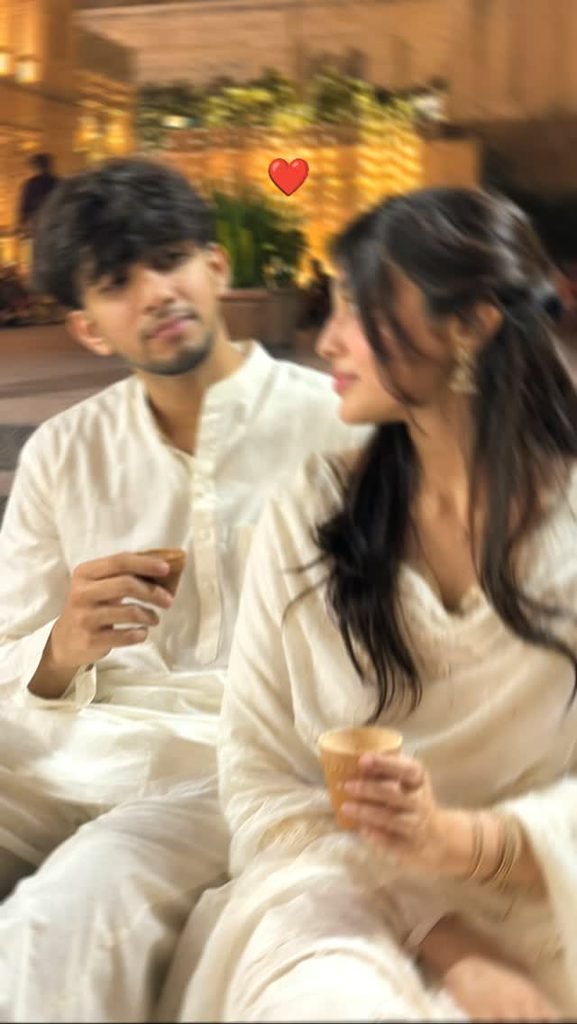
Vertical DSLR-quality portrait recreating a provided reference: two seated subjects in off-white traditional clothing, candid interaction with small tea cups, matching composition, lighting, and facial identity from supplied face reference. For use in photography editing or reference-based image generation.
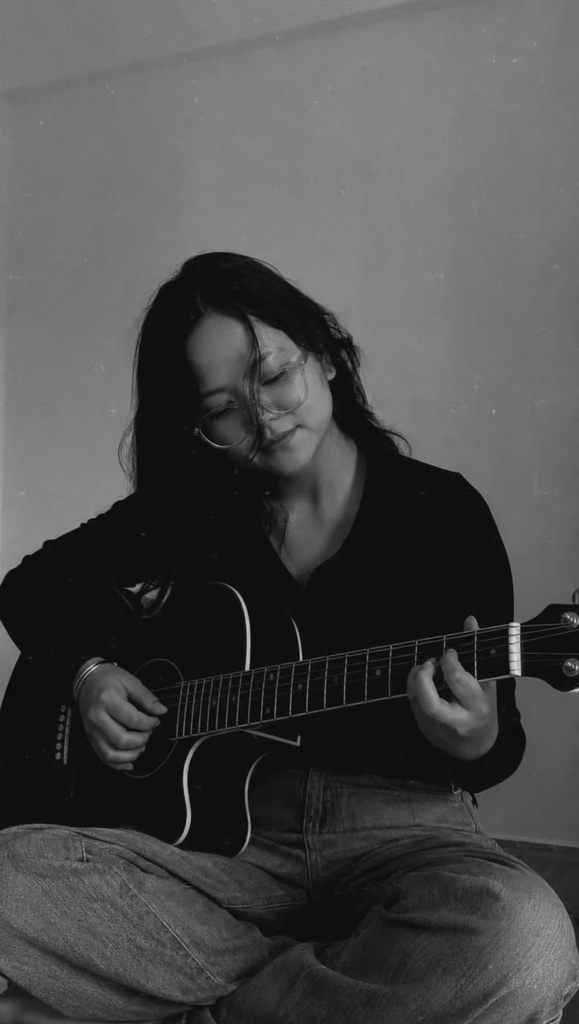
Here’s the prompt⬇️ Ultra-realistic smartphone portrait of a young person sitting cross-legged indoors while playing a black acoustic guitar. They are wearing a fitted black full-sleeve polo shirt and blue jeans with a silver bracelet on their right wrist. Their thick, slightly messy wavy hair naturally frames the face, with a few strands falling over the forehead as they look down at the guitar with a calm, focused expression. Soft warm indoor lighting, plain cream-colored wall background, natural shadows, candid pose, realistic skin texture, authentic mobile camera quality, slight film grain, minimal depth of field, photorealistic, ultra-detailed, 8K, DSLR quality, natural colors, cinematic composition, realistic fabric folds, accurate hand anatomy, vertical 9:16.
How to Generate AI Images: 5 Popular Tools Explained
Once you’ve picked a prompt, here’s exactly how to turn it into an image using five widely used AI tools.
1. ChatGPT (Image Generation)
- Open ChatGPT and start a new chat.
- Paste your prompt directly into the message box — you don’t need any special command.
- Add style details if you want (e.g., “in watercolor style” or “photorealistic”).
- ChatGPT generates the image inline in the chat within a few seconds.
- You can ask for edits conversationally — for example, “make the background darker” or “change her outfit to blue.”
Best for: quick edits through conversation, combining text and image tasks in one place.
2. Google Gemini
- Open Gemini (on the web or app) and select a chat.
- Type your prompt, optionally mentioning aspect ratio or mood.
- Gemini generates the image directly in the response.
- Use follow-up prompts to refine details, swap colors, or change composition.
- Download the image directly from the chat once you’re happy with it.
Best for: users already inside the Google ecosystem (Docs, Photos, Android) who want fast, integrated image generation.
3. Midjourney
- Join the Midjourney Discord server or use the standalone web app.
- Type
/imaginefollowed by your prompt (on Discord) or paste it into the prompt bar (on the web app). - Midjourney generates four image variations at once.
- Use the U1–U4 buttons to upscale a version you like, or V1–V4 to create variations of it.
- Add parameters like
--ar 16:9for aspect ratio or--style rawfor a more realistic look.
Best for: highly artistic, painterly, and cinematic-looking images — a favorite among digital artists.
4. Leonardo AI
- Sign up at Leonardo AI and open the image generation dashboard.
- Select a model (e.g., Leonardo Vision, PhotoReal, or Anime models depending on your style).
- Paste your prompt into the prompt field and adjust settings like image count, resolution, and guidance scale.
- Click Generate — Leonardo will produce multiple variations.
- Use the built-in Canvas or Universal Upscaler tools to refine or upscale your final pick.
Best for: users who want fine control over style presets, resolution, and consistent character generation.
5. Stable Diffusion (via Playground AI or DreamStudio)
- Go to Playground AI or DreamStudio and create a free account.
- Choose a Stable Diffusion model version (e.g., SDXL) from the model list.
- Enter your prompt, and optionally add a negative prompt (things to avoid, like “blurry, extra fingers, low quality”).
- Adjust settings such as guidance scale (how closely it follows your prompt) and number of steps.
- Click Generate, then download or further edit the image using inpainting tools if needed.
Best for: users who want full customization, open-source flexibility, and control over technical parameters.
Quick Tips for Better AI Image Prompts
- Be specific about lighting — words like “golden hour,” “cinematic lighting,” or “soft studio light” dramatically change the mood.
- Mention the art style — “digital painting,” “3D render,” “photorealistic,” or “anime style” all guide the output differently.
- Add camera details for realism — phrases like “shot on 50mm lens, shallow depth of field” push tools toward photographic results.
- Use negative prompts where supported (Stable Diffusion, Leonardo) to avoid common AI artifacts like distorted hands or extra limbs.
- Iterate, don’t settle — the first generation is rarely perfect. Refine your prompt or regenerate 2–3 times to get the best result.
Frequently Asked Questions (FAQ)
1. Which AI tool gives the best quality images for free? Google Gemini and ChatGPT both offer solid free-tier image generation. Midjourney and Leonardo AI give more artistic control but usually need a paid plan after the free trial credits run out.
2. Can I use AI-generated images for commercial purposes? Most tools (ChatGPT, Gemini, Midjourney, Leonardo AI, Stable Diffusion) allow commercial use on their paid plans — always check the specific tool’s current terms of service before using an image in a paid product, ad, or client project.
3. Why do AI images sometimes have distorted hands or extra fingers? This is a common limitation of diffusion-based models, since hands have complex, varied shapes that are hard to learn perfectly. Adding a negative prompt like “extra fingers, distorted hands” (supported in Stable Diffusion and Leonardo AI) or regenerating the image a few times usually helps.
4. How long should an AI image prompt be? There’s no fixed rule — short prompts (5–10 words) work fine for simple ideas, while detailed prompts (20–40 words) with style, lighting, and camera details usually produce more polished, specific results.
5. What’s the difference between Midjourney and Stable Diffusion? Midjourney is a closed, hosted service known for painterly, cinematic-looking output with less manual control. Stable Diffusion is open-source, so it can be run locally or through platforms like Playground AI, and gives much finer control over settings, models, and negative prompts.
6. Do I need any design skills to generate good AI images? No — you just need a clear, well-written prompt. Understanding basic photography or art terms (lighting, composition, style) helps, but it’s not required to get usable results.
7. Can I edit an AI-generated image after it’s created? Yes. Tools like ChatGPT and Gemini let you ask for edits conversationally, while Leonardo AI and Stable Diffusion-based platforms offer dedicated inpainting/editing tools to change specific parts of an image.
Final Thoughts
Trending AI image prompts are an easy way to create fresh, engaging content while teaching your audience something genuinely useful. Pair a strong prompt list with clear, tool-specific instructions like the ones above, and you’ve got an article that keeps readers on the page longer — which is exactly the kind of content that tends to perform well with ad networks and drive higher RPM.