
Creating high-quality AI images no longer requires expensive software or complex tools. With the latest ChatGPT image generation feature, you can generate ultra-realistic, cinematic, and even festival-themed images—directly from text prompts.
In this guide, you’ll learn exactly how to create Janmashtami-themed divine portraits using only ChatGPT, while preserving real facial identity and achieving professional results.
🚀 What is ChatGPT Image Generation?
ChatGPT now allows users to create and edit images directly inside the chat by simply describing what they want. You can also upload an image and ask ChatGPT to transform it while keeping important elements unchanged.
Unlike traditional tools, this works entirely through text prompts, making it faster and beginner-friendly.
🎯 Step-by-Step: How to Create AI Images in ChatGPT
✅ Step 1: Open ChatGPT Image Mode
- Open ChatGPT
- Start a new chat
- Simply type your prompt like:
👉 “Create an image of…”
No special command needed—ChatGPT automatically generates the image.
✅ Step 2: (Optional) Upload Reference Image
If you want to preserve face identity, upload a photo and then describe changes.
👉 This is important because:
- AI can match the exact face
- Keeps identity realistic
- Avoids “generic AI face” problem
✅ Step 3: Write a Detailed Prompt (Most Important)
The quality of your image depends 80% on your prompt.
A strong prompt should include:
- Subject (person, face, pose)
- Styling (outfit, theme)
- Lighting (cinematic, soft, golden)
- Background (Vrindavan, dreamy, etc.)
- Constraints (keep face same, don’t change pose)
🔵 PROMPT 1 — Cinematic Krishna Theme (High-Converting Visual)
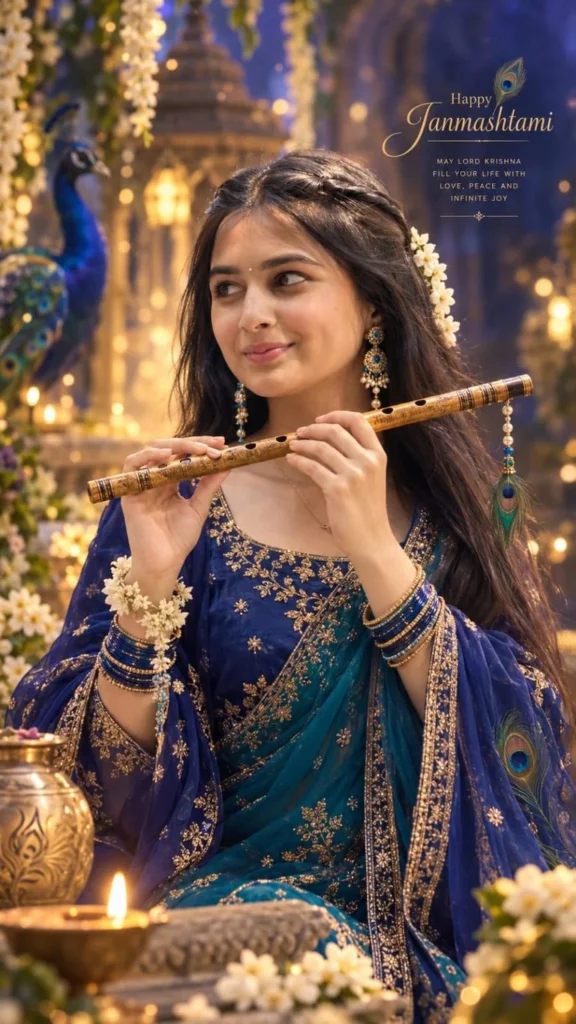
Create a stunning, divine, cinematic Janmashtami portrait of the girl in the reference image, preserving her facial identity exactly—same face shape, eyes, eyebrows, nose, lips, jawline, skin tone, and natural side-profile proportions. Do not create a generic AI face. She wears an elegant royal-blue and peacock-blue traditional outfit with intricate gold embroidery, delicate jewellery, flowers, and subtle peacock-feather details. She gently holds a beautifully crafted golden-brown wooden flute horizontally with both hands near her face. Her expression is serene, graceful, and subtly smiling. Long, natural dark hair flows around her. Set the scene in a magical Vrindavan-inspired environment with soft golden divine light, blue-purple ambience, glowing particles, flowers, and dreamy bokeh. Use a three-quarter side profile, cinematic composition, soft rim lighting, warm highlights, realistic skin texture, natural anatomy, highly detailed eyes, shallow depth field, premium editorial photo.🌸 PROMPT 2 — Radha Rani Traditional Look (AdSense-Friendly & Viral Style)
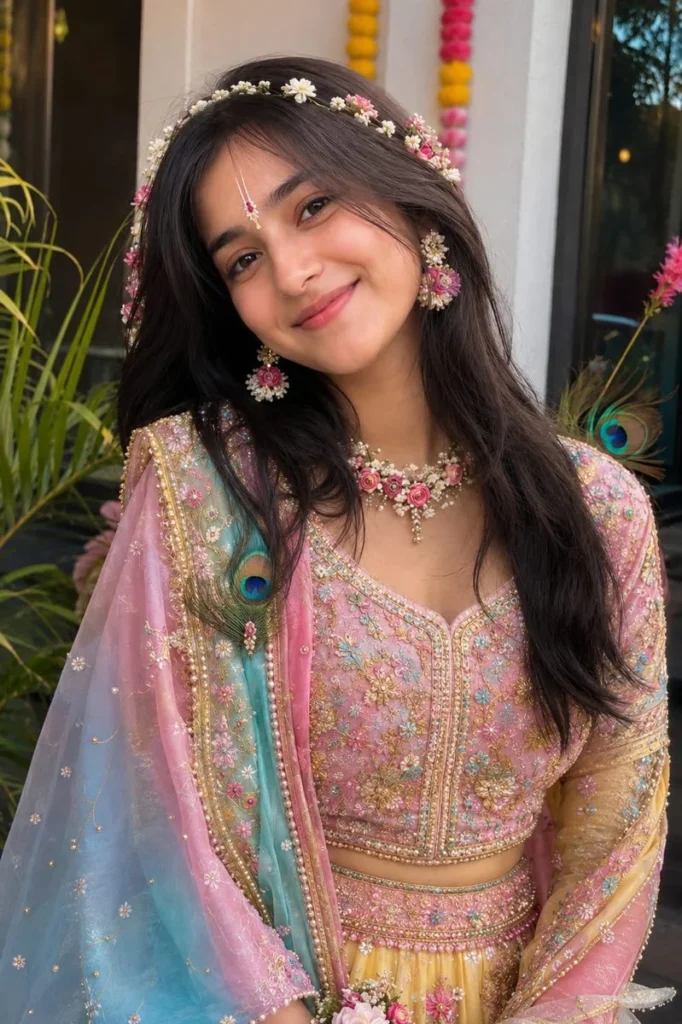
Create a photorealistic Radha Rani-inspired traditional look using the uploaded image as the exact reference.

IMPORTANT - PRESERVE THE ORIGINAL PERSON:

Keep the face, facial features, identity, skin tone, expression, eyes, nose, lips, face shape and proportions exactly the same as the original photo.

Keep the exact same pose, body position, hand placement, head angle, camera angle, framing and composition.

Do not change the person's identity or facial structure.

Do not alter the original pose or crop/zoom the image.

Radha Rani Styling: Transform only the styling and outfit into a beautiful, elegant and colourful Radha Rani-inspired traditional look.

Add a vibrant traditional lehenga in soft pastel pink, magenta, yellow, turquoise and subtle golden tones.

Add delicate golden embroidery and elegant traditional detailing.

Use fresh floral accessories as the main jewellery theme: small flowers around the hair, floral earrings, delicate floral necklace, floral wrist accessories and subtle flower embellishments.

Add a graceful Radha-style floral hair decoration.

Add a minimal, elegant Radha Rani tilak on the forehead while keeping the original forehead and facial features unchanged.

Add a few delicate peacock feathers as subtle decorative elements, keeping the overall look graceful rather than heavy.

Keep the styling youthful, soft, divine and elegant - not overly dramatic.

Lighting & Background: Use soft cinematic lighting with a colourful dreamy atmosphere, subtle warm pink, golden, peach and blue tones, gentle glow and realistic shadows. Keep the background aesthetically pleasing and slightly dreamy while maintaining the original composition.

Realism: Ultra-realistic photography, natural skin texture, realistic hair strands, detailed fabric and embroidery, authentic flowers, realistic jewellery, high-resolution details, cinematic depth, premium portrait photography.

Strict instruction: Change only the outfit, accessories, makeup/tilak and styling. Preserve the original face, identity, expression, pose, body proportions, camera angle and composition exactly as they are.
⚙️ Step 4: Refine the Image (Pro Level)
After image generation:
- Say: “Make lighting softer”
- “Keep face same, improve background”
- “Increase realism”
👉 ChatGPT allows continuous editing without starting over.
💰 Why This Method is High eCPM (Monetization Insight)
This topic performs extremely well in USA traffic + AdSense because:
- AI tools = high CPC niche
- Image generation = trending topic
- Tutorials = long session time
- Creative tools audience = high-value advertisers
👉 Best keywords:
- “AI image generator free”
- “create images with ChatGPT”
- “realistic AI portraits”
🔥 Pro Tips for Viral & Premium Results
- Always write: “preserve face exactly”
- Use: cinematic lighting + depth of field
- Avoid: “cartoon”, “illustration” (if realism needed)
- Keep prompt clean and structured
🏁 Final Conclusion
Creating stunning Janmashtami AI images using ChatGPT is simple when you:
✔ Use a clear reference image
✔ Write detailed prompts
✔ Add strict instructions (what NOT to change)
✔ Refine step-by-step
With the right approach, you can generate ultra-realistic, divine, and viral-ready images—perfect for blogs, Instagram, and high-RPM AdSense websites.