
AI image generation is evolving rapidly, and now you can create cinematic, high-end editorial portraits directly inside ChatGPT. One of the most trending styles right now is the dark aesthetic music-listening scene, which combines minimal lighting, futuristic UI, and realistic photography.
In this guide, you’ll learn how to turn your normal photo into a premium 9:16 cinematic portrait using only ChatGPT.
🚀 What Makes This Style So Popular?
This type of image performs extremely well on:
- Instagram Reels & Stories
- YouTube Shorts thumbnails
- AI art blogs (high AdSense RPM)
- Pinterest & visual platforms
👉 Reason: It combines emotion + technology + cinematic lighting, which attracts high-value audiences.
🎯 Step 1: Upload Your Photo in ChatGPT
To keep the same identity and face, you must upload your image first.
This ensures:
- Face remains 100% real
- No AI-generated fake identity
- Professional results
⚙️ Step 2: Use a Detailed Cinematic Prompt
Now comes the most important part — your prompt.
Below is your optimized, high-quality prompt 👇
🎬 PROMPT — Dark Aesthetic Music Scene
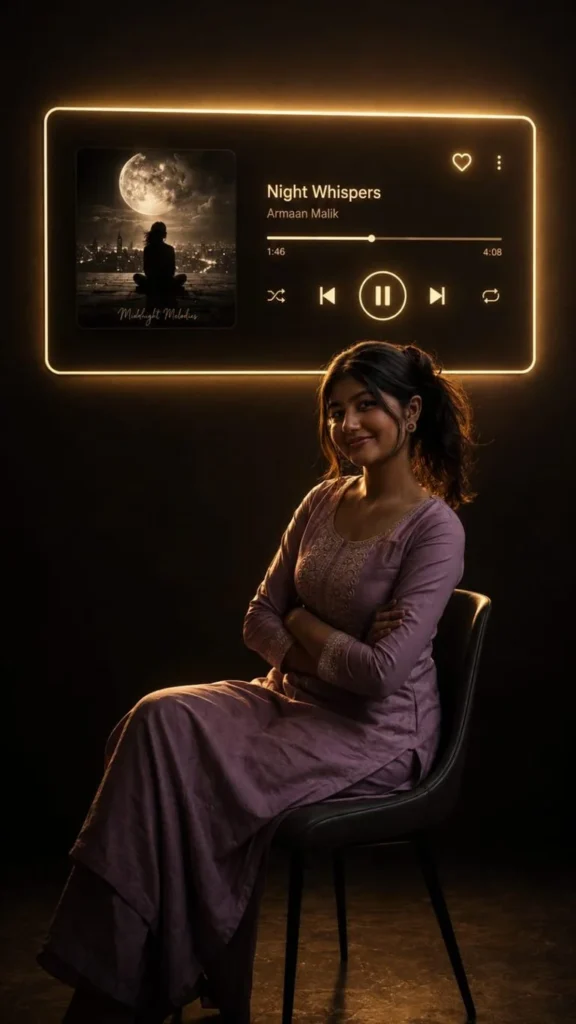
Transform my uploaded photo into a cinematic 9:16 vertical portrait inspired by a dark aesthetic music-listening scene.

Keep the exact same person from my uploaded photo — preserve their identity, face, facial features, hairstyle, skin tone, body proportions and clothing. Do not replace or redesign the person.

Place the person sitting naturally on a simple chair in a dark, minimal room, shown mostly as a dramatic silhouette from a side/three-quarter angle. Keep the pose realistic and elegant, with subtle rim lighting outlining the body and hair.

On the wall behind the person, create a large futuristic music-player panel with a soft warm white/golden neon glow around its edges. Inside the panel, show the uploaded/selected album artwork on the left and a realistic modern music-player interface on the right with:
Song: [SONG NAME]
Artist: [ARTIST NAME]
A progress bar, heart icon, menu icon, shuffle, previous, large pause/play button, next and repeat icons.

Make the music-player panel look physically mounted on the wall with realistic glow and light spill onto the room. Keep the background almost completely dark, with subtle shadows and reflections on the floor.

Use realistic photography, cinematic low-key lighting, warm ambient glow, deep blacks, soft shadows, realistic skin texture, natural proportions, subtle film grain, premium editorial aesthetic, high detail, photorealistic, dramatic composition.

Aspect ratio: 9:16 vertical.
🧠 Step 3: Customize for Better Results
Prompt use karte waqt aap ye customize kar sakte ho:
- Song Name: Apna favorite song
- Artist: Trending ya personal choice
- Mood: Sad / Chill / Romantic
- Lighting: Warm / Neon / Blue
👉 Example:
“Song: Night Changes | Artist: One Direction”
🎨 Step 4: Refine the Output
Image generate hone ke baad aap ChatGPT se bol sakte ho:
- “Make lighting more dramatic”
- “Increase glow from panel”
- “Keep face same, improve realism”
- “Add more depth and shadows”
👉 Isse aap professional-level output achieve kar sakte ho.
💰 Why This Topic Has High eCPM
Ye niche high CPC (Cost Per Click) category me aata hai:
- AI Tools & Software
- Creative Editing
- Digital Art & Design
- Content Creation
👉 USA traffic me iska RPM bahut high hota hai because:
- Tech audience valuable hoti hai
- Creative professionals ads par click karte hain
- Tools/software ads expensive hote hain
🔥 Pro Tips for Viral Results
- Always use “preserve identity exactly”
- Keep background dark + minimal
- Add neon glow + cinematic lighting
- Use 9:16 format (Reels friendly)
- Avoid over-editing (realism lose ho jata hai)
🏁 Final Conclusion
With the right prompt and approach, you can transform any normal photo into a:
✔ Cinematic music-style portrait
✔ High-quality social media visual
✔ Premium editorial image
✔ Viral-ready AI artwork
All of this is possible using only ChatGPT, without any advanced editing tools.